
RV WiFi Guide: Campground WiFi, Extenders, Hotspots and Mobile Routers Explained

Few things are more frustrating on the road than a spinning loading icon. Whether you work remotely, stream in the evenings or just want to video call family, reliable RV WiFi makes a big difference. But “WiFi” in an RV can mean several different things: the campground WiFi network, an extender that reaches a distant signal, a hotspot that turns cellular data into WiFi, or a router that combines several connections. This guide explains each piece in plain language, when it helps, and how to put them together into a setup you can rely on.
Last reviewed and updated: September 30, 2026. Written by Jeremy Jarvis.
Key takeaways
- Campground WiFi is a bonus, not a plan: shared networks are often slow or congested, especially in the evening.
- A WiFi extender or booster strengthens an existing network; it cannot create internet where no network exists.
- Your own mobile hotspot or RV router with cellular gives you a private network you control.
- A mobile router can combine cellular, campground WiFi and satellite into one network for all your devices.
We draw on explanations from RV Life, Camping World and the Mobile Internet Resource Center, a long-running resource for mobile internet. Every location is different, though, so think of these as tools in a toolbox rather than a single magic fix.
How RV WiFi actually works
It helps to separate two ideas. First, there is the internet connection itself, which comes from somewhere outside the RV: a cell tower, a satellite or a campground’s network. Second, there is the WiFi network inside your RV, which shares that connection with your phones, laptops and TVs. Many problems come from mixing these up. For example, a strong WiFi signal inside the RV does not help if the internet connection behind it is slow.
The Mobile Internet Resource Center describes the router’s role well: it acts as a gateway between your local network, meaning your devices, and the wide area network, meaning the internet. In a house, that internet usually arrives by cable or fiber. On the road, however, it comes from cellular, public WiFi or satellite, and often from more than one at a time.
The truth about campground WiFi
Many campgrounds advertise WiFi, and some offer excellent service. Even so, campground WiFi is shared by every camper in the park, often over a few access points. As a result, it can slow down sharply in the evenings when everyone is streaming. Camping World’s writer described intentionally choosing campgrounds that advertised WiFi on a cross-country trip, and still being stressed about the connection before work meetings at two of them; a third required an extra fee for a pass to get reliable WiFi.
Free download: The Full-Time RV Launch Checklist
Our 16-page planner: a 12-month countdown, inspection checklist, budget and weights worksheets and a maintenance calendar. Free and printable.
That does not mean campground WiFi is useless. For email, browsing and large downloads at off-peak times, it can be great, and it saves your cellular data. RV Life also suggests asking for the password when you check in. The key is to treat campground WiFi as a bonus, not your only plan. Before booking, read recent reviews from other campers, who often mention WiFi quality, and ask the office how many access points they have and where.
RV WiFi extenders and boosters
If your site is far from the campground’s access point, a WiFi extender can help. RV Life describes an extender as an extra antenna that helps boost an unusable or unavailable WiFi network: it picks up the signal with an exterior antenna mounted on your rig and rebroadcasts it inside your RV. When your devices send data, the extender powers it back up to the access point.
However, extenders have clear limits. RV Life’s booster guide is direct: a WiFi booster does not create an internet connection; it strengthens an existing one. In addition, if the network is slow or congested, your connection will be too. And obviously, you need a WiFi network to extend, so at remote campgrounds with no WiFi, an extender does nothing. RV Life also notes that the terms booster, extender and repeater are often used for similar devices, and that you really will not know whether one solves your problem until you try it at a given site.
Mobile hotspots: your own private network
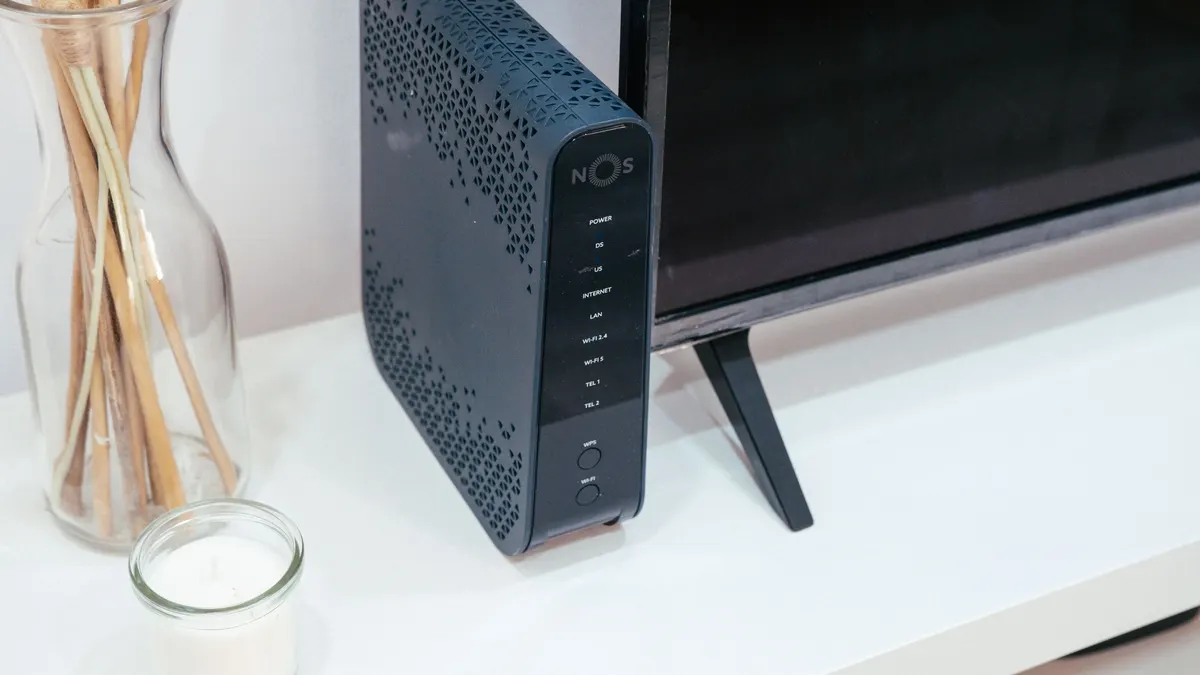
A hotspot turns cellular data into a private WiFi network. RV Life describes it as your own private WiFi network broadcast from your phone or a small device approved by your carrier. Most phones can act as a hotspot, which is handy in a pinch. For heavier use, many RVers prefer a dedicated hotspot device, which frees up the phone and often has better antennas and battery life.
Camping World notes that many remote workers carry an RV WiFi hotspot wherever they go, because it removes the outside variable of campground WiFi. The trade-off is that a hotspot depends on cell coverage and on your data plan. So check carrier coverage maps for where you camp, and read plan terms carefully, since some plans limit hotspot data or slow it after a threshold. If the cellular signal is weak, a cell booster can help; our RV cell signal booster guide explains how the two work together.
RV routers: bringing it all together
A mobile router is the hub of a more advanced RV WiFi setup. The Mobile Internet Resource Center explains that you need a router if you want multiple devices to share a single upstream connection, or if you want local devices to talk to each other, such as a laptop casting to a TV. It also notes that typical home routers are usually out of their element in an RV, because they are designed for one wired connection. Mobile routers, by contrast, are built to handle the types of connections RVers use.
Many RV routers can use several sources. Some have a built-in cellular modem. Others support “WiFi as WAN”, which means they connect to campground WiFi and share it on your private network. Most also accept a wired connection from a satellite dish such as Starlink. As a result, a good router lets you switch between sources, or even combine them, while every device in the RV stays connected to the same familiar network name.
RV Life calls portable WiFi routers the next step up in mobile cellular internet, often combining features of hotspots and extenders to create a personal network in your RV, much like a home WiFi network. For many full-timers and remote workers, the router is the most important piece of the whole system.
RV WiFi options compared
| Option | What it does | Best for | Limits |
|---|---|---|---|
| Campground WiFi | Shared park network | Light use, off-peak downloads | Often congested; quality varies |
| WiFi extender or booster | Reaches a distant WiFi network | Sites far from the access point | Cannot fix a slow network or create one |
| Phone hotspot | Shares phone data over WiFi | Occasional use, backups | Drains phone battery; plan limits |
| Dedicated hotspot | Cellular-to-WiFi device | Regular use, remote work | Needs coverage and a data plan |
| Mobile router | Hub for cellular, WiFi and satellite | Full-timers, multiple devices | More cost and setup |
| Satellite internet | Internet from orbit | Places with no cell or WiFi | Needs clear sky and more power |
Not sure where to start? Our RV Internet Setup Selector suggests a primary and backup setup based on how and where you travel.
Building a layered RV WiFi setup
Because no single source works everywhere, the most reliable approach is to layer connections. One common progression looks like this:
- Start with your phone hotspot and campground WiFi for light use.
- Upgrade to a dedicated hotspot or cellular router once you depend on the internet daily.
- Add a second carrier so one network covers gaps in the other.
- Install a cell booster if you often camp in fringe signal areas.
- Bring satellite if you camp off-grid or cannot miss a workday.
- Tie it together with a router so every device uses one network.
This layered approach means a weak signal in one place rarely leaves you offline. For example, when a campground’s WiFi slows in the evening, the router can switch to cellular. Likewise, when you are deep in a forest with no cell signal, satellite keeps you connected. For more on satellite, see our guide to Starlink for RV.

Placing your RV WiFi equipment
Where you put your equipment matters almost as much as what you buy. Metal and fiberglass RV walls weaken signals, so inside antennas work best near a window. Exterior antennas, used by extenders and many routers, should be mounted as high as practical with a clear view of the campground access point or cell tower. In addition, place the router centrally inside the RV so it covers the whole rig, and keep it away from microwaves and other electronics that can cause interference.
Also, think about which side of the RV faces the access point at each campsite. Moving a hotspot from one side to the other, or simply raising it a few feet, can make a surprising difference. RV Life’s advice to face a booster toward the WiFi transmitter reflects the same principle.
Staying secure on campground WiFi
Public networks are convenient, but they are shared with strangers. To protect yourself, use your own router or hotspot to create a private network, so your devices are not directly exposed on the campground network. Keep your devices and router firmware updated, use strong passwords on your own network, and turn off file sharing on laptops. In addition, many travelers use a VPN on public networks for an extra layer of privacy, especially for banking and work. For sensitive tasks, your own cellular connection is usually the safer choice.
RV WiFi for streaming and remote work
Different activities need different things. Streaming needs steady download speed and lots of data, so evenings on congested campground WiFi can be a struggle. Remote work, on the other hand, especially video calls, depends heavily on upload speed and stable latency. Therefore, remote workers should test both download and upload speeds at each new site, and keep a backup connection ready before important meetings. Our Remote-Work Data Usage Calculator helps you estimate how much data your work and streaming habits need each month.
When traveling abroad, the same principles apply, but your data source may change. Our guide to the eSIM for travel explains how to add a data plan for Canada, Mexico and beyond.
Using campground WiFi wisely
Several habits help you get the most out of campground WiFi. First, use it at off-peak times, such as early morning, for large downloads and software updates. Second, pause automatic cloud backups during the evening rush. Third, if the park offers a paid premium tier, compare it with the cost of extra cellular data. And finally, be a good neighbor: avoid hogging the network with huge downloads when others are trying to work or stream.
Power and RV WiFi equipment
Every piece of connectivity gear needs power, and that matters when you camp off-grid. Hotspots, routers and boosters usually run from 12-volt power or USB, and they draw modest power compared with appliances. Satellite dishes, however, draw much more. So, if you boondock, include your internet gear in your power budget alongside lights, fans and the fridge. Running a router directly from 12 volts, rather than through an inverter, is usually more efficient.
In addition, think about what happens when you drive. Some RVers wire their router to stay on while traveling, so passengers can work or stream in motion. Others shut everything off to save power. Either way, label your switches and know which circuit powers your network, since a tripped fuse or a dead battery is a common cause of a mysterious outage.
Troubleshooting slow RV WiFi
When your connection is slow, work through the chain one step at a time. First, test speed on a device close to the router. If it is fast there but slow elsewhere, the problem is inside the RV, so move the router or add a second access point. If it is slow everywhere, the problem is the internet source. Next, check which source the router is using; it may have switched to congested campground WiFi. Then, for cellular, try moving the hotspot or router to a window facing the tower, or switch to a second carrier. Finally, restart the equipment. Restarting clears many problems, especially after a long drive or a power interruption.
It also helps to keep a simple log. Note the campground, the source and the speeds you saw. Over time, you will learn which carriers and setups work best in the regions you visit, and you can share that knowledge with other RVers in reviews.
Campground WiFi etiquette
Because campground WiFi is shared, a little courtesy keeps it usable for everyone. Avoid large downloads, game updates and high-definition streaming during busy evening hours. Instead, schedule big downloads for early morning. Likewise, do not run a WiFi extender at full power right next to the access point, since it adds nothing and can crowd the network. And if the park offers a separate premium network for remote workers, consider using it rather than competing with families streaming movies. These small habits make the network better for you and your neighbors alike.
RV WiFi setup checklist
- List what you need: browsing, streaming, video calls or all three.
- Check carrier coverage along your planned routes.
- Start with a phone or dedicated hotspot.
- Use an extender only if you rely on campground WiFi.
- Choose a mobile router if you have many devices or several sources.
- Consider a cell booster or satellite for remote camping.
- Secure your network and keep firmware updated.
- Test speeds at each new site before work.
To compare current options, you can browse RV WiFi extenders, mobile hotspots and travel routers on Amazon, then check each device’s carrier and band support.
Common RV WiFi mistakes
- Relying only on campground WiFi. It is a bonus, not a plan.
- Expecting an extender to fix a slow network. It only strengthens the signal.
- Ignoring hotspot limits in your plan. Read the terms.
- Using a home router on the road. Mobile routers handle mobile sources better.
- Skipping security on public networks. Use your own private network.
- Having no backup. Layer two or more connection types.
Reliable RV WiFi comes from understanding each piece and layering them wisely. Use campground WiFi when it works, carry your own hotspot or router, and add boosters or satellite as your needs grow. For more connectivity guides, explore our RV Internet hub.
Frequently asked questions about RV WiFi
How do I get WiFi in my RV?
Common options include campground WiFi, a WiFi extender to reach distant networks, your phone’s hotspot or a dedicated mobile hotspot, a mobile router with cellular, and satellite internet. Many RVers combine two or more for reliability.
Do RV WiFi boosters work?
They can, if there is a network to boost. RV Life explains that a WiFi booster does not create an internet connection; it strengthens an existing one. If the network itself is slow or congested, your connection will be too.
Is campground WiFi good enough for work?
Sometimes, but it is unreliable. Camping World’s writer found that campgrounds advertising WiFi still left them stressed before work meetings, which is why many remote workers carry their own hotspot.
Do I need a router in my RV?
The Mobile Internet Resource Center says you need a router if you want multiple devices to share a single upstream connection or to communicate with each other. Mobile routers are built to handle cellular, WiFi and satellite sources.
Can I use a cell booster with a WiFi hotspot?
Yes. A cell booster improves the cellular signal your hotspot receives, while the hotspot creates the WiFi network inside the RV. They solve different problems and often work well together.
Sources and how we researched this guide
This guide is research-based. We did not test the products mentioned. Explanations of WiFi extenders, hotspots and routers come from RV Life, Camping World and the Mobile Internet Resource Center. Results vary with location, network and equipment. Found something out of date? Tell us and we will check it against the source.
- RV Life: 7 easy ways to get WiFi at your campground
- RV Life: RV WiFi booster 101
- Camping World: do you need an RV WiFi hotspot
- Mobile Internet Resource Center: selecting an RV mobile router
Keep planning
- Full-Time RV Living: A Complete Guide to Planning, Costs and Life on the Road
- eSIM for Travel: How Travel eSIMs Work for RV Trips to Canada, Mexico and Beyond
- RV Cell Signal Booster Guide: How Boosters Work, Setup, and Real Expectations
- Starlink for RV: Plans, Power Draw, and Setup for Life on the Road
Go deeper: Work From the Road hub · Mobile Office Checklist · Remote-Work Data Usage Calculator

Written by Jeremy Jarvis
Jeremy Jarvis is the founder and editor of Freedom Road Living, where he builds research-based guides and free planning tools for people who live, work and travel in an RV. He sets the site's editorial standards, checks every guide against official sources such as the National Park Service and manufacturer documentation, and is responsible for corrections. Jeremy also founded Eco Nomad Travel, Mind Clarity Hub, SilkHarborTravel and WanderOza Travel, and he is the author of books on clarity, focus and practical AI, including The Power of Clarity and Digital Clarity.